Showing posts with label SAPGUI. Show all posts

Friday, June 10, 2011

How to configure SAPGUI for Java on Linux

This tutorial will show you how to set configure new connection on SAPGUI for Java. You need to click on SAPGUI for Java. On this tutorial, I am using SAPGUI for Java on Linux 7.20 rev 5 (the latest one on this date).

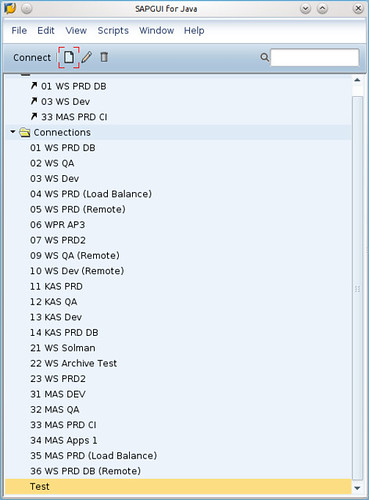
Click on SAPGUI for Java icon.


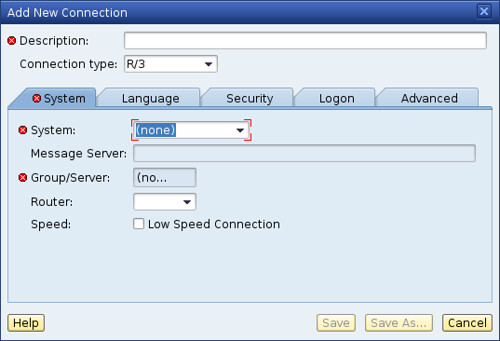
Click on File - New Connection.


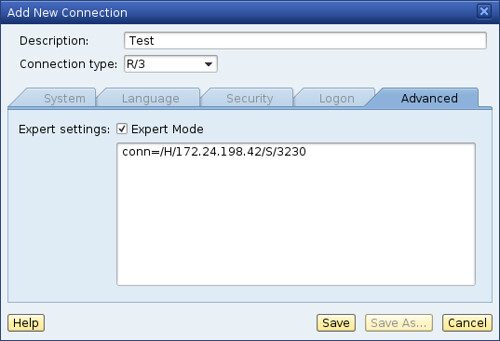
Fill Description (by your ID) and choose Advanced Tab.


For connection, you can fill with /H/IP_Address_of_your_SAP_server/S/32[Your_SAP_System_Number]


Now you have connection to your SAP server. But this connection is not for load balance connection. For Load Balance connection, I'll show you on the next tutorial.


SAPGUI for Java on Linux : Installation and Configuration

I have created this document for people who need to install SAPGUI into Linux.

1) Minimum system requirements.

  • Linux
  • Hardware: CPU: Intel PentiumIII with 800 MHz
  • RAM: 256MB
  • Software:
  • OS: SuSE Linux 9.3 - 10.1, Red Hat Enterprise Linux 3 and 4
  • JVM: Sun Java Runtime Evironment 1.4.2 (32-bit) or 5.0 (32-bit) including Java Plugin
(please see:
http://java.sun.com/j2se/1.4.2/install-linux.html http://java.sun.com/j2se/1.4.2/docs/...ocale.doc.htmlhttp://java.sun.com/j2se/1.5.0/install-linux.html http://java.sun.com/j2se/1.5.0/docs/...ocale.doc.html for details)


2) Download SAPGUI from:

ftp://ftp.sap.com/pub/sapgui/java/
(anonymous login) --> not valid anymore

https://websmp201.sap-ag.de/sapgui-java
(OSS user and pass)


3) At the /java folder in ftp select:

File: PlatinGUI-Linux-700.jar 37926 KB 11/07/06 13:58:00

(note: a more recent version may be available)

4) In the downloaded folder, execute

Code:
java -jar PlatinGUI-Linux-700.jar
5) Executing SAPGUI

a) Guilogon:

Code:
~/SAPClients/SAPGUI7.00/bin$ ./guilogon
To create servers, touch at new and go to "advanced".

-- tip “use expert configuration”

Example:

For server 10.1.1.6 with system number 01:

Code:
conn=/H/10.1.1.6/S/3201

B) Command line

For server 10.1.1.6 with system number 01:

Code:
~/SAPClients/SAPGUI7.00/bin$ ./sapgui /H/10.1.1.6/S/3201

Monday, November 3, 2008

Best linux distro for SAPGUI for Java based desktop client v2.0 (part 3)


Previously I have posted about linux distro here and here, now I am going to continue my review about OpenSuSE 11.0 as one of linux distro which is also supported by SAPGUI for Java.

Starting on this release, finally OpenSuSE - as other linux distro too - has included SUN Java (Thanks to SUN which had been released Java under Open Source license). In fact, OpenSuSE has done great job on this release. They said this is one of the best OpenSuSE release ever. That's make me so happy. I am SuSE fans...

According to OpenSuSE website (http://www.opensuse.org) on their release notes :

"The openSUSE Project is proud to announce the release of openSUSE 11.0 - everything you need to get started with Linux on the desktop and on the server. Promoting the use of Linux everywhere, the openSUSE Project provides free, easy access to the world’s most usable Linux distribution, openSUSE. The 11.0 release of openSUSE includes more than 200 new features specific to openSUSE, a redesigned installer that makes openSUSE even easier to install, faster package management thanks to major updates in the ZYpp stack, and KDE 4, GNOME 2.22, Compiz Fusion, and much more."

Also check this out for latest Compiz feature. Very nice. I like it.

OpenSuSE also come with SAMBA which is mandatory for running as SAPGUI ready desktop client.

But just as your consideration before choosing OpenSuSE, your computer specification must have minimumly 512 MB memory. But I recommend you to have 1 GB memory for minimum requirement. Currently, I am using OpenSuSE 11.0 on my Acer notebook

Happy migrating !!

Saturday, November 1, 2008

Best linux distro for SAPGUI for Java based desktop client v2.0 (part 2)

As previous stated on my posting before, I still recommended Vector Linux with newer version 5.9.1 SOHO Edition. From Vector Linux website release notes, they mentioned this :

"We have released SOHO-5.9.1-DELUXE! To complement it we have released a standard version, free for download!!

The 5.9.1 release is a maintenance bug fix release for the previous SOHO 5.9 and includes 52 updates to the core system. You will also find Firefox-3.0.1, opera-9.52, pidgin-2.5.1, sane-1.0.19 and a host of others. The kernel has been upgraded to 2.6.25.7 for better driver support in both sound and wifi.

After long consideration we determined that this was just to darned good and we wanted everyone to see just how good this is. We are confident that after trying the free version you will want to come back and purchase the DELUXE version. In addition to an expanded first disk, the deluxe version comes with a second multimedia CD which contains loads of extras, including more applications, functionality and original artwork.

The default desktop is KDE 3.5.9. More than just amazing eye candy, KDE's extensive collection of graphical tools makes it easy to use for non-technical users. Still, the speedy Fluxbox is available for power users. The included office suite, image manipulation and desktop publishing software will quickly put Small Office/Home Office users to work. Since regular breaks have been shown to increase productivity, you will also find a nice collection of games. For the server role, samba, apache, mysql and php are included.

For those who have purchased the previous 5.9 SOHO release, we are offering the updated 5.9.1 release as a free download from our high speed host SQI. All you need to do is reply to the original email you received with the purchase and request download instructions. Any other requests concerning the purchase of 5.9 and the 5.9.1 update can be directed to support@vectorlinux.com
"

From my own point of view, Vector Linux has given us great distro, even if we have just had its CD without any software supplement. They have given us SAMBA server, Secure Shell (SSH) server, CUPS, The latest Open Office version, and nice modified and boosted KDE desktop environment.

We need SAMBA server so desktop which has printers attached can print from SAP. It will collaborate with Windows based SAP Print Server (contact me if you want to get paid support). Also, we need SSH server on linux client to support end user without bothering while they are working. Of course we need CUPS since it is default printer daemon on Linux. Open Office has become default office application on Linux and even on several countries has decided to use OpenOffice type for their default document processor. Nice looking GUI would help user to migrate from Windows.
Vector Linux also, by default, has included SUN JRE so you don't have to download them separately. All you need is install this distro and run it.

So personally, I still highly recommended Vector Linux based on its stability, light, fast, and compact size. Hey...It's only one CD and you'll get everything.

Wednesday, October 29, 2008

Best linux distro for SAPGUI for Java based desktop client v2.0 (part 1)

From my previous posting on sapbasis.wordpress, I have clearly explain about how to search about best linux distro to use as SAPGUI for Java based desktop client. Well, I am SAP Basis and also linux distro is continue to grow on its version and quantity so I decide to write another posting about same topic which I called "Best Linux distro for SAPGUI for Java based client v2.0".

Right now, I am going to guide you about how to search linux distro and may I'll post another one. That's why I also gave part 1 on this posting headline :D
I'll re-post few words from my previous posting :

  • Must be able to run SUN java runtime environment.
  • Must have OpenOffice. The latest version will be better so you won't be bother with OO installation.
  • Having remote desktop so IT Support can gave fast support.
  • Fast linux distro installation would be great
  • Better support and documentation. Paid support, community support or both of them would be better.
  • Regular distro release
Also from this posting, I recommend Vector Linux 5.0 SOHO edition and Ubuntu.

I wan to update this posting information now. As you know that SUN finally has released Java code to be open source (although Sun own licensing) so almost all Linux distro has include SUN JRE on its release. Java license issue used to be major issue for major distro which only include GNU GPL-ed applications.

Linux distros also increasing from software quality and quantity. Ubuntu and OpenSuSE is most popular linux distro based on distrowatch view. Ubuntu derivatives such as Linux Mint gain greate popularity since it is include almost all linux user want such as restricted audio and video codec. Vector Linux also has done great job by releasing Vector Linux 5.9.1 SOHO edition. You'll get all application out of the box just in once installation.

For this moment, I recommend Linux Mint (the latest version is 5.0), Vector Linux (the latest version 5.9.1 SOHO edition), and OpenSuSE (the latest version is 11.0). All of this is the latest version when this review is written.

So, happy linux-ing your dekstop client and happy working with SAPGUI for Java