I have already posted on my previous review
here,
here, and
here. Now, I am going to post about Linux Mint, one of the best out of the box Ubuntu based Linux distro. I used to have this distro on my notebook before switching to OpenSuSE.
Linux Mint has great features according to their latest release notes such as :
mintMenu improvements
In Daryna, mintInstall and the Software Portal made it easy to install applications. In Elyssa mintMenu is making it easy to remove them. You don't need to open synaptic or to launch a terminal anymore, if you want to uninstall an application, simply right-click on it in the menu and select “Uninstall”.
mintUpdate improvements
MintUpdate was introduced in Daryna and quickly became one of the most popular tools on the Linux Mint desktop. It came to our attention that a lot of people weren't aware of how it worked internally (for instance, the difference between its user and admin runtime modes). For this reason we developed an information screen from which the active logs can be read, and the runtime mode and process id can be seen.
mintInstall improvements
.mint files can be quite complex as there's almost nothing you can do in a terminal that a .mint file can't do. In practice though, 99% of the .mint files present in the Software Portal consist in describing the installation of an application using APT. Most of these files describe the installation of only one package, and in most cases this package is present in the default repositories. In Daryna mintInstall used to backup the local sources.list, define its own, and then restore things as they were. This resulted in APT being told to update twice. In Elyssa, the mintInstall client checks if the packages are present within the repositories defined on your system, if they are the client gives you the choice of whether you want to use your sources.list ("local repositories") or the one coming with the file ("default repositories"). The default selection is "local" and as it basically saves 2 APT updates the installation of the application via mintInstall is consequently much faster.
Improvements in other tools
The network autobrowsing feature was removed from mintDesktop as it wasn't mature enough to be part of this LTS release. Gnome 2.22 introduced its own compositing manager which can now be activated/deactivated from mintDesktop. Mintupload's email feature was removed and replaced with a "Copy" button, which simply copies the shared URL to the buffer.
Desktop improvements
Gnome-Do doesn't just come installed by default in Elyssa, it's configured to run in the background. Press SUPER+SPACE and it should appear. From there you can quickly launch an application or use any of the advanced features provided by this tool.
Performance improvements
MintUpdate was refactored and its memory usage was drastically reduced. On some systems the amount of RAM used by mintUpdate after a few days went from 100MB to 6MB.
Mozilla also greatly improved the memory usage in Firefox between version 2 and 3 (Read more). Elyssa comes with kernel version 2.6.24 which features a brand new scheduler called CFS (Completely Fair Scheduler, Read more). The kernel scheduler is responsible for the CPU time allocated to each process. With CFS the rules have changed. Without proper benchmarks it's hard to actually tell the consequences of this change but the difference in behavior is quite noticeable from a user's point of view. Some tasks seem slower, but overall the system feels much snappier. Elyssa comes with Gnome version 2.22 which features a new virtual filesystem layer called GVFS. Although the improvements over the old GNOME-VFS system are geared towards robustness and additional capabilities more than performance the Nautilus file browser seems more responsive and the progress feedback given while moving sets of files actually gives the impression of smoother, almost faster, operations. Linux Mint is growing and acquired a second dedicated server. The Linux Mint repositories (starting from Elyssa) are now hosted on a distinct server so updating and installing mint packages is now much faster.
Better Look and feel
All Mint tools were reviewed and changes were made for their graphical interface to be more compliant with the Gnome Human Interface Guidelines. The default set of GTK widgets used in Daryna was called MurrinaIndustrialSM. Subtle changes and refinements were made to it. Sliders now use the Clearlooks engine, scrollbars are now white and come with handles, columns headers were made glossy, dotted lines were added in tables and the roundness level was decreased slightly. Overall it looks pretty similar to Daryna and you might not notice the difference until you actually look into it. It's all about attention to details though and we're quite happy with the improvements we made on this. The colors are also configurable now so that's probably great news for people looking for an easy way to make Linux Mint a little greener.
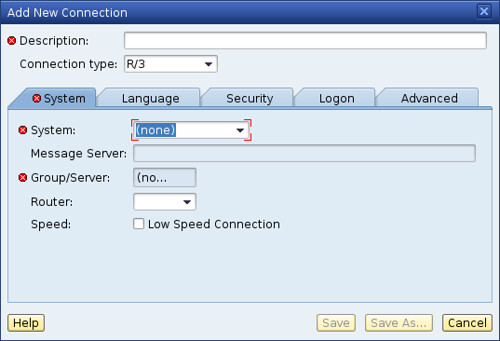
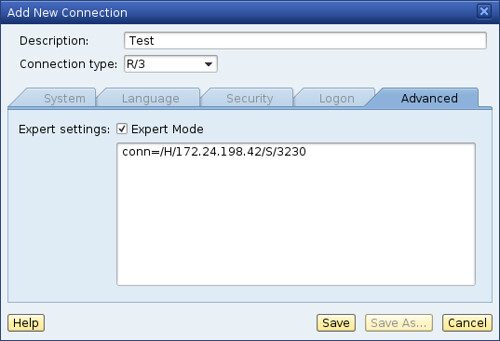
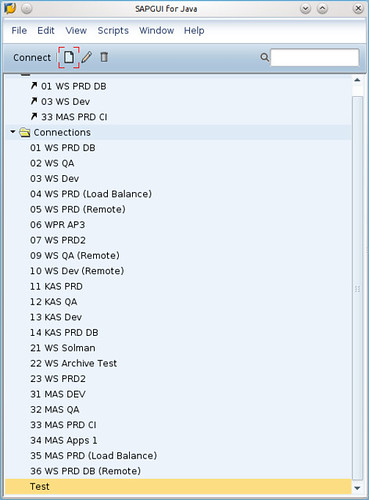
And some other great features.Linux Mint powered itself with SUN JRE 1.6 out of the box, restricted audio and video codec, etc. You can directly installed SAPGUI for Java here without worrying about JRE.
I am still highly recommend this distro especially for Linux newbie and label this distro as one of SAPGUI ready Linux distro. This distro is absoultely free and please consider to donate to help Clement Lefebvre maintain this distro. Happy Mint-ing !!