Showing posts with label Linux. Show all posts

Thursday, June 30, 2011

Performance Tuning on Linux for Oracle Database

  • Using all the resources available to you?
  • Many default settings in Linux suck
  • Font server for X Windows is running as a daemon by default, but do you need it?
  • Check out these tunings that can give you lots of computing juice...

Kernel

To successfully run enterprise applications, such as a database server, on your Linux distribution, you may be required to update some of the default kernel parameter settings. For example, the 2.4.x series kernel message queue parameter msgmni has a default value (for example, shared memory, or shmmax is only 33,554,432 bytes on Red Hat Linux by default) that allows only a limited number of simultaneous connections to a database.  Here are some recommended values (by the IBM DB2 Support Web site) for database servers to run optimally:

- kernel.shmmax=268435456 for 32-bit
- kernel.shmmax=1073741824 for 64-bit
- kernel.msgmni=1024
- fs.file-max=8192
- kernel.sem="250 32000 32 1024"

Shared Memory

To view current settings, run command:
# more /proc/sys/kernel/shmmax
To set it to a new value for this running session, which takes effect immediately, run command:
# echo 268435456 > /proc/sys/kernel/shmmax
To set it to a new value permanently (so it survives reboots), modify the sysctl.conf file:
...
kernel.shmmax = 268435456
...

Semaphores

To view current settings, run command:
# more /proc/sys/kernel/sem 
250 32000 32 1024 
To set it to a new value for this running session, which takes effect immediately, run command:
# echo 500 512000 64 2048 > /proc/sys/kernel/sem
Parameters meaning:
SEMMSL - semaphores per ID
SEMMNS - (SEMMNI*SEMMSL) max semaphores in system
SEMOPM - max operations per semop call
SEMMNI - max semaphore identifiers

ulimits

To view current settings, run command:
# ulimit -a
To set it to a new value for this running session, which takes effect immediately, run command:
# ulimit -n 8800
# ulimit -n -1 // for unlimited; recommended if server isn't shared

Alternatively, if you want the changes to survive reboot, do the following:

- Exit all shell sessions for the user you want to change limits on.
- As root, edit the file /etc/security/limits.conf and add these two lines toward the end:
 user1        soft    nofile          16000
 user1        hard    nofile          20000
  ** the two lines above changes the max number of file handles - nofile - to new settings.
- Save the file.
- Login as the user1 again. The new changes will be in effect.


Message queues

To view current settings, run command:
# more /proc/sys/kernel/msgmni
# more /proc/sys/kernel/msgmax
To set it to a new value for this running session, which takes effect immediately, run command:
# echo 2048 > /proc/sys/kernel/msgmni
# echo 64000 > /proc/sys/kernel/msgmax

Network


Gigabit-based network interfaces have many performance-related parameters inside of their device driver such as CPU affinity.  Also, the TCP protocol can be tuned to increase network throughput for connection-hungry applications. 


Tune TCP

To view current TCP settings, run command:
# sysctl net.ipv4.tcp_keepalive_time
net.ipv4.tcp_keepalive_time = 7200 // 2 hours
where net.ipv4.tcp_keepalive_time is a TCP tuning parameter.
To set a TCP parameter to a value, run command:
# sysctl -w net.ipv4.tcp_keepalive_time=1800
A list of recommended TCP parameters, values, and their meanings:
Tuning Parameter  Tuning Value    Description of impact 
------------------------------------------------------------------------------
net.ipv4.tcp_tw_reuse 
net.ipv4.tcp_tw_recycle  1    Reuse sockets in the time-wait state 
---
net.core.wmem_max   8388608   Increase the maximum write buffer queue size 
---
net.core.rmem_max   8388608   Increase the maximum read buffer queue size 
---
net.ipv4.tcp_rmem   4096 87380 8388608  Set the minimum, initial, and maximum sizes for the 
       read buffer. Note that this maximum should be less 
       than or equal to the value set in net.core.rmem_max. 
---
net.ipv4.tcp_wmem   4096 87380 8388608  Set the minimum, initial, and maximum sizes for the 
       write buffer. Note that this maximum should be less 
       than or equal to the value set in net.core.wmem_max. 
---
timeout_timewait   echo 30 > /proc/sys/net/ipv4/tcp_fin_timeout Determines the time that must elapse before 
       TCP/IP can release a closed connection and reuse its resources. 
       This interval between closure and release is known as the TIME_WAIT 
       state or twice the maximum segment lifetime (2MSL) state. 
       During this time, reopening the connection to the client and 
       server cost less than establishing a new connection. By reducing the 
       value of this entry, TCP/IP can release closed connections faster, providing 
       more resources for new connections. Adjust this parameter if the running application 
       requires rapid release, the creation of new connections, and a low throughput 
       due to many connections sitting in the TIME_WAIT state. 

Disk I/O


Choose the Right File System
Use 'ext3' file system in Linux.
- It is enhanced version of ext2
- With journaling capability - high level of data integrity (in event of unclean shutdown)
- It does not need to check disks on unclean shutdown and reboot (time consuming)
- Faster write - ext3 journaling optimizes hard drive head motion

# mke2fs -j -b 2048 -i 4096 /dev/sda
mke2fs 1.32 (09-Nov-2002)
/dev/sda is entire device, not just one partition!
Proceed anyway? (y,n) y
Filesystem label=
OS type: Linux
Block size=2048 (log=1)
Fragment size=2048 (log=1)
13107200 inodes, 26214400 blocks
1310720 blocks (5.00%) reserved for the super user
First data block=0
1600 block groups
16384 blocks per group, 16384 fragments per group
8192 inodes per group
Superblock backups stored on blocks:
        16384, 49152, 81920, 114688, 147456, 409600, 442368, 802816, 1327104,
        2048000, 3981312, 5619712, 10240000, 11943936

Writing inode tables: done
Writing superblocks and filesystem accounting information: done

This filesystem will be automatically checked every 28 mounts or
180 days, whichever comes first.  Use tune2fs -c or -i to override.

Use 'noatime' File System Mount Option
Use 'noatime' option in the file system boot-up configuration file 'fstab'.  Edit the fstab file under /etc.  This option works the best if external storage is used, for example, SAN:


# more /etc/fstab
LABEL=/                 /                       ext3    defaults        1 1
none                    /dev/pts                devpts  gid=5,mode=620  0 0
none                    /proc                   proc    defaults        0 0
none                    /dev/shm                tmpfs   defaults        0 0
/dev/sdc2               swap                    swap    defaults        0 0
/dev/cdrom              /mnt/cdrom              udf,iso9660 noauto,owner,kudzu,ro 0 0
/dev/fd0                /mnt/floppy             auto    noauto,owner,kudzu 0 0
/dev/sda                /database               ext3    defaults,noatime 1 2
/dev/sdb                /logs                   ext3    defaults,noatime 1 2
/dev/sdc                /multimediafiles        ext3    defaults,noatime 1 2

Tune the Elevator Algorithm in Linux Kernel for Disk I/O
After choosing the file system, there are several kernel and mounting options that can affect it. One such kernel setting is the elevator algorithm. Tuning the elevator algorithm helps the system balance the need for low latency with the need to collect enough data to efficiently organize batches of read and write requests to the disk. The elevator algorithm can be adjusted with the following command:

# elvtune -r 1024 -w 2048 /dev/sda
/dev/sda elevator ID 2 
read_latency: 1024 
write_latency: 2048 
max_bomb_segments: 6 
The parameters are: read latency (-r), write latency (-w) and the device affected. 
Red Hat recommends using a read latency half the size of the write latency (as shown). 
As usual, to make this setting permanent, add the 'elvtune' command to the 
/etc/rc.d/rc.local script.

Others

Disable Unnecessary Daemons (They Take up Memory and CPU)
There are daemons (background services) running on every server that are probably not needed. Disabling these daemons frees memory, decreases startup time, and decreases the number of processes that the CPU has to handle. A side benefit to this is increased security of the server because fewer daemons mean fewer exploitable processes.


Some example Linux daemons running by default (and should be disabled).  Use command:
#/sbin/chkconfig --levels 2345 sendmail off 
#/sbin/chkconfig sendmail off 
Daemon
Description
apmd
Advanced power management daemon
autofs
Automatically mounts file systems on demand (i.e.: mounts a CD-ROM automatically)
cups
Common UNIX� Printing System
hpoj
HP OfficeJet support
isdn
ISDN modem support
netfs
Used in support of exporting NFS shares
nfslock
Used for file locking with NFS
pcmcia
PCMCIA support on a server
rhnsd
Red Hat Network update service for checking for updates and security errata
sendmail
Mail Transport Agent
xfs
Font server for X Windows

Shutdown GUI
Normally, there is no need for a GUI on a Linux server. All administration tasks can be achieved by the command line, redirecting the X display or through a Web browser interface.  Modify the 'inittab' file to set boot level as 3:

To set the initial runlevel (3 instead of 5) of a machine at boot, 
modify the /etc/inittab file as shown:

Saturday, June 11, 2011

Finding SAP CCMS version on Linux

You might want to know the rightt version of your SAP CCMS you're using on your Linux SAP Server right now.


Login to your SAP server and switch to [sid]adm user :


 To find sapccm4x version. First, login to the system as adm. Then execute the below command.

> sapccm4x -v
 CCMS version  20040229, 32 bit, multithreaded, Non-Unicode
 compiled at   Oct  2 2005
 systemid      387 (Intel x86 with Linux)
 relno         6400
 patch text    patch collection 2005/6, OSS note 809007
 patchno       93
 intno         20020600
 running on     Linux 2.6.5-7.139-bigsid #1 Fri Jan 14 15:41:33 UTC
• To find sapccmsr version. First, login to the system as adm. Then execute the below command.
> sapccmsr -v
 CCMS version  20040229, 32 bit, multithreaded, Non-Unicode
 compiled at   Oct  2 2005
 systemid      387 (Intel x86 with Linux)
 relno         6400
 patch text    patch collection 2005/6, OSS note 809007
 patchno       93
 intno         20020600
 running on     Linux 2.6.5-7.139-bigsid #1 Fri Jan 14 15:41:33 UTC

Friday, June 10, 2011

How to configure SAPGUI for Java on Linux

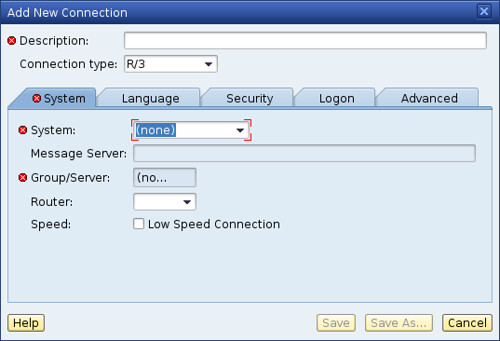
This tutorial will show you how to set configure new connection on SAPGUI for Java. You need to click on SAPGUI for Java. On this tutorial, I am using SAPGUI for Java on Linux 7.20 rev 5 (the latest one on this date).

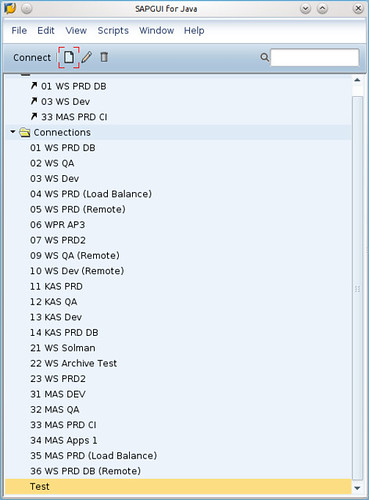
Click on SAPGUI for Java icon.


Click on File - New Connection.


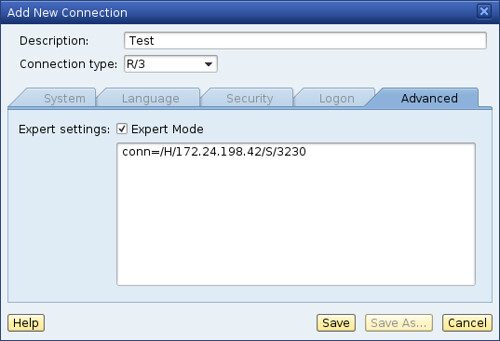
Fill Description (by your ID) and choose Advanced Tab.


For connection, you can fill with /H/IP_Address_of_your_SAP_server/S/32[Your_SAP_System_Number]


Now you have connection to your SAP server. But this connection is not for load balance connection. For Load Balance connection, I'll show you on the next tutorial.


SAPGUI for Java on Linux : Installation and Configuration

I have created this document for people who need to install SAPGUI into Linux.

1) Minimum system requirements.

  • Linux
  • Hardware: CPU: Intel PentiumIII with 800 MHz
  • RAM: 256MB
  • Software:
  • OS: SuSE Linux 9.3 - 10.1, Red Hat Enterprise Linux 3 and 4
  • JVM: Sun Java Runtime Evironment 1.4.2 (32-bit) or 5.0 (32-bit) including Java Plugin
(please see:
http://java.sun.com/j2se/1.4.2/install-linux.html http://java.sun.com/j2se/1.4.2/docs/...ocale.doc.htmlhttp://java.sun.com/j2se/1.5.0/install-linux.html http://java.sun.com/j2se/1.5.0/docs/...ocale.doc.html for details)


2) Download SAPGUI from:

ftp://ftp.sap.com/pub/sapgui/java/
(anonymous login) --> not valid anymore

https://websmp201.sap-ag.de/sapgui-java
(OSS user and pass)


3) At the /java folder in ftp select:

File: PlatinGUI-Linux-700.jar 37926 KB 11/07/06 13:58:00

(note: a more recent version may be available)

4) In the downloaded folder, execute

Code:
java -jar PlatinGUI-Linux-700.jar
5) Executing SAPGUI

a) Guilogon:

Code:
~/SAPClients/SAPGUI7.00/bin$ ./guilogon
To create servers, touch at new and go to "advanced".

-- tip “use expert configuration”

Example:

For server 10.1.1.6 with system number 01:

Code:
conn=/H/10.1.1.6/S/3201

B) Command line

For server 10.1.1.6 with system number 01:

Code:
~/SAPClients/SAPGUI7.00/bin$ ./sapgui /H/10.1.1.6/S/3201

Wednesday, November 5, 2008

Best linux distro for SAPGUI for Java based desktop client v2.0 (part 4)

I have already posted on my previous review here, here, and here. Now, I am going to post about Linux Mint, one of the best out of the box Ubuntu based Linux distro. I used to have this distro on my notebook before switching to OpenSuSE.

Linux Mint has great features according to their latest release notes such as :

mintMenu improvements

In Daryna, mintInstall and the Software Portal made it easy to install applications. In Elyssa mintMenu is making it easy to remove them. You don't need to open synaptic or to launch a terminal anymore, if you want to uninstall an application, simply right-click on it in the menu and select “Uninstall”.

mintUpdate improvements

MintUpdate was introduced in Daryna and quickly became one of the most popular tools on the Linux Mint desktop. It came to our attention that a lot of people weren't aware of how it worked internally (for instance, the difference between its user and admin runtime modes). For this reason we developed an information screen from which the active logs can be read, and the runtime mode and process id can be seen.

mintInstall improvements

.mint files can be quite complex as there's almost nothing you can do in a terminal that a .mint file can't do. In practice though, 99% of the .mint files present in the Software Portal consist in describing the installation of an application using APT. Most of these files describe the installation of only one package, and in most cases this package is present in the default repositories. In Daryna mintInstall used to backup the local sources.list, define its own, and then restore things as they were. This resulted in APT being told to update twice. In Elyssa, the mintInstall client checks if the packages are present within the repositories defined on your system, if they are the client gives you the choice of whether you want to use your sources.list ("local repositories") or the one coming with the file ("default repositories"). The default selection is "local" and as it basically saves 2 APT updates the installation of the application via mintInstall is consequently much faster.

Improvements in other tools

The network autobrowsing feature was removed from mintDesktop as it wasn't mature enough to be part of this LTS release. Gnome 2.22 introduced its own compositing manager which can now be activated/deactivated from mintDesktop. Mintupload's email feature was removed and replaced with a "Copy" button, which simply copies the shared URL to the buffer.

Desktop improvements

Gnome-Do doesn't just come installed by default in Elyssa, it's configured to run in the background. Press SUPER+SPACE and it should appear. From there you can quickly launch an application or use any of the advanced features provided by this tool.

Performance improvements

MintUpdate was refactored and its memory usage was drastically reduced. On some systems the amount of RAM used by mintUpdate after a few days went from 100MB to 6MB.

Mozilla also greatly improved the memory usage in Firefox between version 2 and 3 (Read more). Elyssa comes with kernel version 2.6.24 which features a brand new scheduler called CFS (Completely Fair Scheduler, Read more). The kernel scheduler is responsible for the CPU time allocated to each process. With CFS the rules have changed. Without proper benchmarks it's hard to actually tell the consequences of this change but the difference in behavior is quite noticeable from a user's point of view. Some tasks seem slower, but overall the system feels much snappier. Elyssa comes with Gnome version 2.22 which features a new virtual filesystem layer called GVFS. Although the improvements over the old GNOME-VFS system are geared towards robustness and additional capabilities more than performance the Nautilus file browser seems more responsive and the progress feedback given while moving sets of files actually gives the impression of smoother, almost faster, operations. Linux Mint is growing and acquired a second dedicated server. The Linux Mint repositories (starting from Elyssa) are now hosted on a distinct server so updating and installing mint packages is now much faster.

Better Look and feel

All Mint tools were reviewed and changes were made for their graphical interface to be more compliant with the Gnome Human Interface Guidelines. The default set of GTK widgets used in Daryna was called MurrinaIndustrialSM. Subtle changes and refinements were made to it. Sliders now use the Clearlooks engine, scrollbars are now white and come with handles, columns headers were made glossy, dotted lines were added in tables and the roundness level was decreased slightly. Overall it looks pretty similar to Daryna and you might not notice the difference until you actually look into it. It's all about attention to details though and we're quite happy with the improvements we made on this. The colors are also configurable now so that's probably great news for people looking for an easy way to make Linux Mint a little greener.

And some other great features.

Linux Mint powered itself with SUN JRE 1.6 out of the box, restricted audio and video codec, etc. You can directly installed SAPGUI for Java here without worrying about JRE.

I am still highly recommend this distro especially for Linux newbie and label this distro as one of SAPGUI ready Linux distro. This distro is absoultely free and please consider to donate to help Clement Lefebvre maintain this distro. Happy Mint-ing !!

Monday, November 3, 2008

Best linux distro for SAPGUI for Java based desktop client v2.0 (part 3)


Previously I have posted about linux distro here and here, now I am going to continue my review about OpenSuSE 11.0 as one of linux distro which is also supported by SAPGUI for Java.

Starting on this release, finally OpenSuSE - as other linux distro too - has included SUN Java (Thanks to SUN which had been released Java under Open Source license). In fact, OpenSuSE has done great job on this release. They said this is one of the best OpenSuSE release ever. That's make me so happy. I am SuSE fans...

According to OpenSuSE website (http://www.opensuse.org) on their release notes :

"The openSUSE Project is proud to announce the release of openSUSE 11.0 - everything you need to get started with Linux on the desktop and on the server. Promoting the use of Linux everywhere, the openSUSE Project provides free, easy access to the world’s most usable Linux distribution, openSUSE. The 11.0 release of openSUSE includes more than 200 new features specific to openSUSE, a redesigned installer that makes openSUSE even easier to install, faster package management thanks to major updates in the ZYpp stack, and KDE 4, GNOME 2.22, Compiz Fusion, and much more."

Also check this out for latest Compiz feature. Very nice. I like it.

OpenSuSE also come with SAMBA which is mandatory for running as SAPGUI ready desktop client.

But just as your consideration before choosing OpenSuSE, your computer specification must have minimumly 512 MB memory. But I recommend you to have 1 GB memory for minimum requirement. Currently, I am using OpenSuSE 11.0 on my Acer notebook

Happy migrating !!

Wednesday, October 29, 2008

Best linux distro for SAPGUI for Java based desktop client v2.0 (part 1)

From my previous posting on sapbasis.wordpress, I have clearly explain about how to search about best linux distro to use as SAPGUI for Java based desktop client. Well, I am SAP Basis and also linux distro is continue to grow on its version and quantity so I decide to write another posting about same topic which I called "Best Linux distro for SAPGUI for Java based client v2.0".

Right now, I am going to guide you about how to search linux distro and may I'll post another one. That's why I also gave part 1 on this posting headline :D
I'll re-post few words from my previous posting :

  • Must be able to run SUN java runtime environment.
  • Must have OpenOffice. The latest version will be better so you won't be bother with OO installation.
  • Having remote desktop so IT Support can gave fast support.
  • Fast linux distro installation would be great
  • Better support and documentation. Paid support, community support or both of them would be better.
  • Regular distro release
Also from this posting, I recommend Vector Linux 5.0 SOHO edition and Ubuntu.

I wan to update this posting information now. As you know that SUN finally has released Java code to be open source (although Sun own licensing) so almost all Linux distro has include SUN JRE on its release. Java license issue used to be major issue for major distro which only include GNU GPL-ed applications.

Linux distros also increasing from software quality and quantity. Ubuntu and OpenSuSE is most popular linux distro based on distrowatch view. Ubuntu derivatives such as Linux Mint gain greate popularity since it is include almost all linux user want such as restricted audio and video codec. Vector Linux also has done great job by releasing Vector Linux 5.9.1 SOHO edition. You'll get all application out of the box just in once installation.

For this moment, I recommend Linux Mint (the latest version is 5.0), Vector Linux (the latest version 5.9.1 SOHO edition), and OpenSuSE (the latest version is 11.0). All of this is the latest version when this review is written.

So, happy linux-ing your dekstop client and happy working with SAPGUI for Java

Wednesday, October 22, 2008

Linux distro supported by SAP

Currently SAP has support Linux as well as other OS such as IBM AIX, HP HP-UX, SUN Solaris, and Microsoft Windows. You can install SAP R/3 server on hardware that running Linux. SAP try to do their best to support Linux. However, to minimize confuseness and standardization, SAP only support some of Linux distro. Linux distro which has been supported by SAP are Redhat Enterprise Linux (RHEL), SuSE Enterprise Linux Server (SLES).

From all of Linux distro that Redhat and Novell has, this list give you explanation about which version :

Novell / SUSE:

Red Hat:

  • Red Hat Enterprise Linux 5 for x86, x86_64, IPF, IBM iSeries, IBM pSeries and IBM zSeries
  • Red Hat Enterprise Linux 4 for x86, x86_64, IPF, IBM iSeries and IBM pSeries
  • Red Hat Enterprise Linux 3 for x86 and IPF
  • Red Hat Enterprise Linux 2.1 for x86
  • Red Hat Linux 7.1 Professional (out of maintenance)
  • Red Hat Linux 6.2 (out of maintenance)
  • Red Hat Linux 6.1 Enterprise Version 1.0 (out of maintenance)
Other Linux distro maybe unofficially supported but that's fine. Distro like CentOS, Startcom can be used because they are RHEL compatible. Popular and famous distro like Debian, Ubuntu still not supported yet. But still, you can try it on development system.

I have already test RHEL 4 and SLES 9 as SAP R/3 server. It has great performance and stable. So, try it out., guys.

Saturday, October 18, 2008

What is Linux ?

Linux is operating system created by Linus Torvalds in 1991. It's UNIX like. Currently, Linux was used on almost all type of hardware starting from huge and sophisticated mainframe, server, desktop PC, notebook until tiny cellular phone.

Linux is just another Unix operating system. People like its technical quality, performance, stability (despite the development speed), the wide range of software, worldwide support, comprehensive and easy-to-read documentation, clean design and user-friendly desktops. It's just fun to work with. But the main reason Linux became so popular is: it is Open Source! Basically, the rules of the game are: f

  • all users have the right to redistribute the software
  • the source code is available to all users
  • any publicly distributed modifications/enhancements to Open Source products must be Open Source as well

The development method differs from conventional methods, but there is no difference from the user's perspective; Open Source products have well defined release numbers, and companies offer professional support (which they charge for!)